Introduction to Rcpp
Statisticians Advancing in R
for Data Science
Marquette University
STAR-DS - SDSS 2026
Outline
- Motivation & Introduction
- Getting Started with
evalCpp()&cppFunction() - Using
sourceCpp() - Data Types & Conversions
- Standard Template Library (STL)
- Using Rcpp in Packages
- Advanced Topics & Resources
Motivation & Introduction
- Performance Bottlenecks: loops, recursion, complex operations
- Rcpp: smooth bridge between R and C++
- Do things you could not do before
Advantages:
- Low overhead function calls
- Access to STL (data structures & algorithms)
- Cleaner, maintainable code
Basic Usage: evalCpp()
evalCpp()evaluates a single C++ expression. Includes and dependencies can be declared.This allows us to quickly check C++ constructs.
Simple Example
- R Version of ‘is this number odd or even’
Simple Example - Using cppFunction()
- Rcpp Version of ‘is this number odd or even’
Rcpp::cppFunction("
bool isOdd_cpp(int num = 10) {
  bool result = (num % 2 == 1);
  return result;
}")
c(isOdd_cpp(42L), isOdd_cpp(43L))
># [1] FALSE TRUE- Use
cppFunction()in R console or script - Fast prototyping & testing
- Good for small functions
Second Example: VAR(1)
Let’s consider a simple possible \(VAR(1)\) system of \(k\) variables.
For \(k = 2\):
\[ X_t = X_{t-1} B + E_t \]
where \(X_t\) is a row vector of length \(2\), \(B\) is a \(2×2\) matrix, and \(E_t\) is a row of the error matrix of \(2\) columns.
Second Example: VAR(1)
In R (C++) code, given both the coefficient and error matrices:
Second Example: VAR(1)
Rcpp::cppFunction('arma::mat cppSim(arma::mat B, arma::mat E) {
  int m = E.n_rows, n = E.n_cols;
  arma::mat X(m, n);
  X.row(0) = arma::zeros<arma::mat>(1, n);
  for (int r = 1; r < m; r++) {
    X.row(r) = X.row(r-1) * B + E.row(r);
  }
  return X;
}', depends="RcppArmadillo")

a <- matrix(c(0.5, 0.1, 0.1, 0.5), nrow = 2)
e <- matrix(rnorm(10000), ncol = 2)
rbenchmark::benchmark(cppSim(a, e), rSim(a, e), order="relative")[, 1:4]

>#    test           replications elapsed relative
># 1  cppSim(a, e)  100         0.010   1.0
># 2  rSim(a, e)    100         0.728  72.8
Growth of Rcpp
- Sometimes speed is not the only reason
- Easy access to C/C++ libraries
- C & C++ provide numerous libraries + APIs
- Easy to provide access to as Rcpp eases data transfer
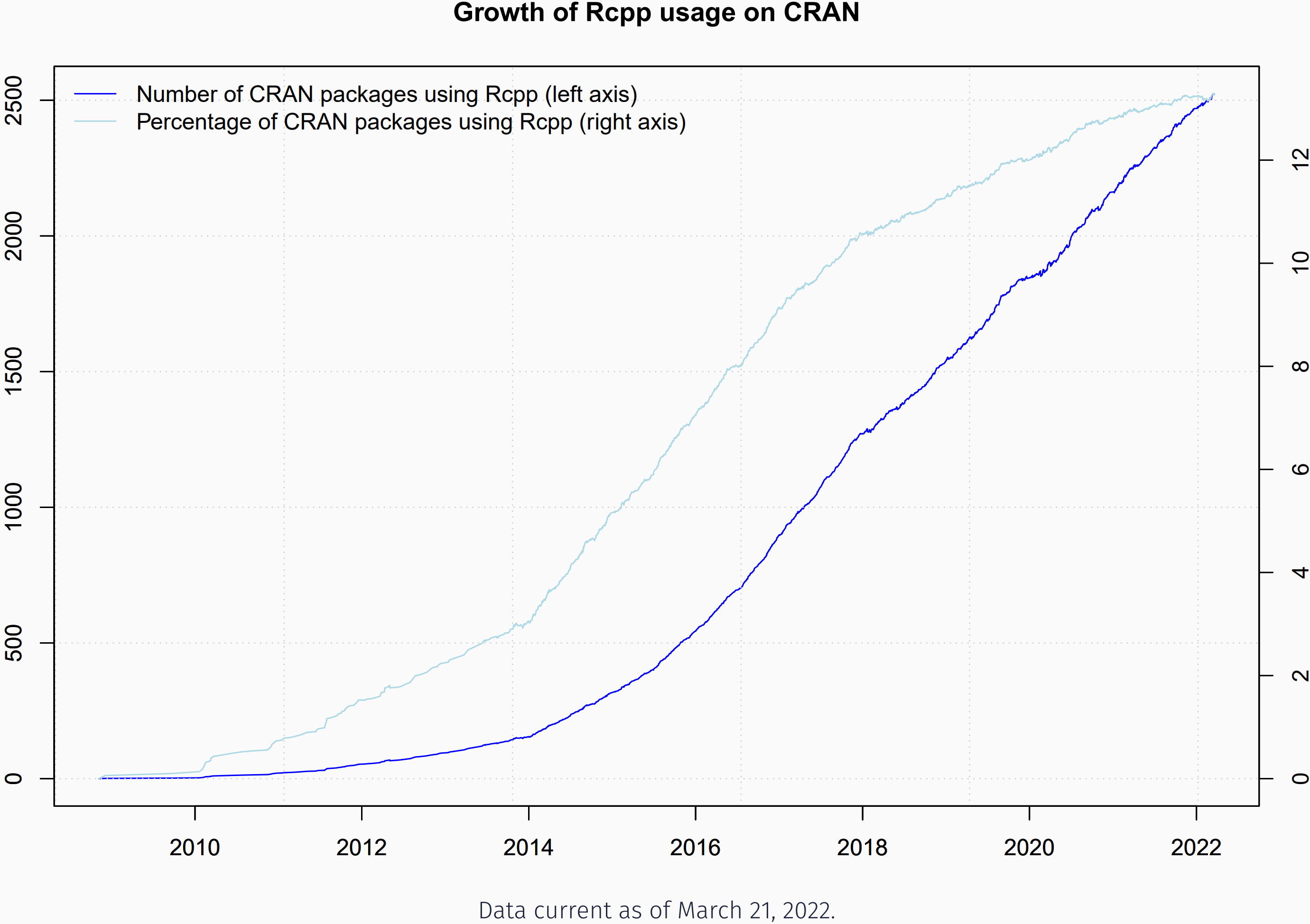
- Rcpp is currently used by
- 3127 CRAN packages
- 250+ BioConductor packages
- an unknown (but “large”) number of GitHub projects
Pagerank
#remotes::install_github("https://github.com/andrie/pagerank.git")
suppressMessages(library(utils))
library(pagerank)

cran <- "https://cloud.r-project.org"
pr <- compute_pagerank(cran)
round(100 * pr[1:5], 3)

>#   Rcpp    ggplot2     dplyr      MASS   magrittr
># 2.744     1.516       1.274    1.122    0.814
Percentage of Compiled Packages
db <- tools::CRAN_package_db()       # added in R 3.4.0
db <- db[!duplicated(db[, 1]), ]     # rows: number of packages

nTot <- nrow(db)                     # columns: different attributes
nRcpp <- length(tools::dependsOnPkgs("Rcpp", recursive = FALSE, installed = db))
nCompiled <- table(db[, "NeedsCompilation"])[["yes"]]

propRcpp <- nRcpp / nCompiled * 100
data.frame(tot = nTot, totRcpp = nRcpp, totCompiled = nCompiled,
           RcppPctOfCompiled = propRcpp)

>#   tot   totRcpp   totCompiled   RcppPctOfCompiled
># 1 23730    3127        5114          61.14587
Rcpp in Rstudio - Using sourceCpp()
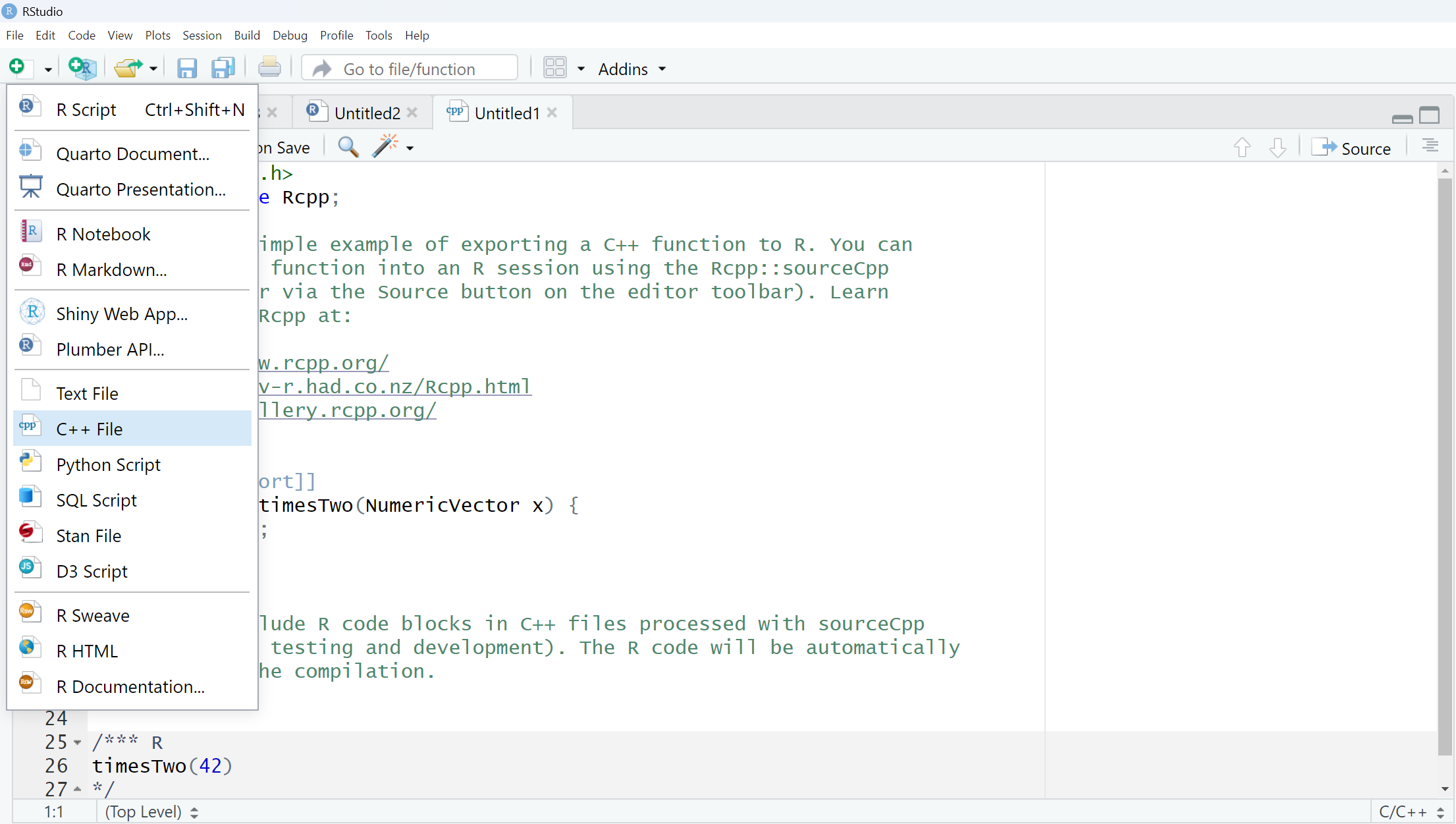
Create standalone
.cppfiles with:
Using sourceCpp()
- So what just happened?
- We defined a simple C++ function
- It operates on a numeric vector argument
- We ask Rcpp to ‘source it’ for us
- Behind the scenes Rcpp creates a wrapper
- Rcpp then compiles, links, and loads the wrapper
- The function is available in R under its C++ name
- We defined a simple C++ function
- Benefits:
- Editor support (syntax highlighting)
- Easier debugging & error tracking
Another Example: Focus on Speed
Consider a function defined as
\[ f(n) = \begin{cases} n & \text{when } n < 2 \\ f(n-1) + f(n-2) & \text{when } n \ge 2 \end{cases} \] that creates Fibonacci sequence. The R implementation and use:
Another Example: Timing R Implementation
- The R implementation:
Another Example: C++ Implementation
Another Example: Comparing Timing
- Rcpp implementation:
- Timing:
- A nice gain of a few orders of magnitude.
Another Example: sourceCpp(“fib-helper.cpp”)
#include <Rcpp.h>
using namespace Rcpp;

// This is a simple example of exporting a C++ function to R. You can
// source this function into an R session using the Rcpp::sourceCpp
// function (or via the Source button on the editor toolbar). Learn
// more about Rcpp at:
//
//   http://www.rcpp.org/
//   http://adv-r.had.co.nz/Rcpp.html
//   http://gallery.rcpp.org/
//

// [[Rcpp::export]]
int rec_fib_cpp(int n) {
  if (n < 2) return(n);
  return(rec_fib_cpp(n - 1) + rec_fib_cpp(n - 2));
}

// [[Rcpp::export]]
long long fib_cpp(int n) {
  if (n <= 1) return n;
  long long a = 0, b = 1, temp;
  for (int i = 2; i <= n; ++i) {
    temp = b;
    b = a + b;
    a = temp;
  }
  return b;
}

// You can include R code blocks in C++ files processed with sourceCpp
// (useful for testing and development). The R code will be automatically
// run after the compilation.
//

/*** R
all.equal(fib_cpp(15), fib_r(15), rec_fib_cpp(15), rec_fib_r(15))
*/Another Example: Wrap-up
library(rbenchmark)
benchmark(fib_cpp(25), fib_r(25), rec_fib_cpp(25), rec_fib_r(25))[, 1:4]
>#              test replications elapsed relative
># 1     fib_cpp(25)          100    0.00       NA
># 2       fib_r(25)          100    0.00       NA
># 3 rec_fib_cpp(25)          100    0.03       NA
># 4   rec_fib_r(25)          100    7.98       NA

library(microbenchmark)
microbenchmark(R = fib_r(47), Rcpp = fib_cpp(47), times = 100L)
># Unit: nanoseconds
>#  expr  min   lq mean median   uq   max neval
>#     R 2600 2700 3049   2700 2800 18500   100
>#  Rcpp  600  600  783    700  700  6500   100

microbenchmark(R = fib_r(92), Rcpp = fib_cpp(92), times = 100L)
># Unit: nanoseconds
>#  expr  min   lq mean median   uq   max neval
>#     R 3700 3800 4154   4000 4000 19900   100
>#  Rcpp  500  600  765    700  750  8000   100
Data Types & Conversions
R vectors ↔︎ C++ classes:
NumericVector,IntegerVector,CharacterVector,LogicalVector
Scalars:
double,int,String,boolKey methods:
.size(),.begin(),.end()- Constructors:
NumericVector out(n)
Types
R Type mapping:
- Standard R types (integer, numeric, list, function, … and compound objects) are mapped to corresponding C++ types:
library(Rcpp)
cppFunction("NumericVector logabs(NumericVector x) {
  return log(abs(x));
}")
logabs(seq(-5, 5, by = 2))
># [1] 1.609438 1.098612 0.000000 0.000000 1.098612 1.609438- Vectorized C++! Here
log(abs())runs directly on vectors as R would.
STL Type Mapping
code/logabs2.cpp
Not vectorized but ‘sweeps’ f() along std::vector<double> via STL std::transform().
Hands-on Exercises (30 min)
Using Rcpp in Packages
Add to package:
LinkingTo: Rcppin DESCRIPTIONuseDynLib(pkg)&importFrom(Rcpp, sourceCpp)in NAMESPACE
usethis::use_rcpp()automates setupRun
Rcpp::compileAttributes()to generate bindingsThirteen Simple Steps Vignette by Dirk Eddelbuettel
Summary & Q&A

- Key takeaways:
- Profile before optimizing
- Inline vs file-based workflows
- Master data conversions & STL
- Questions?